API Reference - Unthread
Create a service account
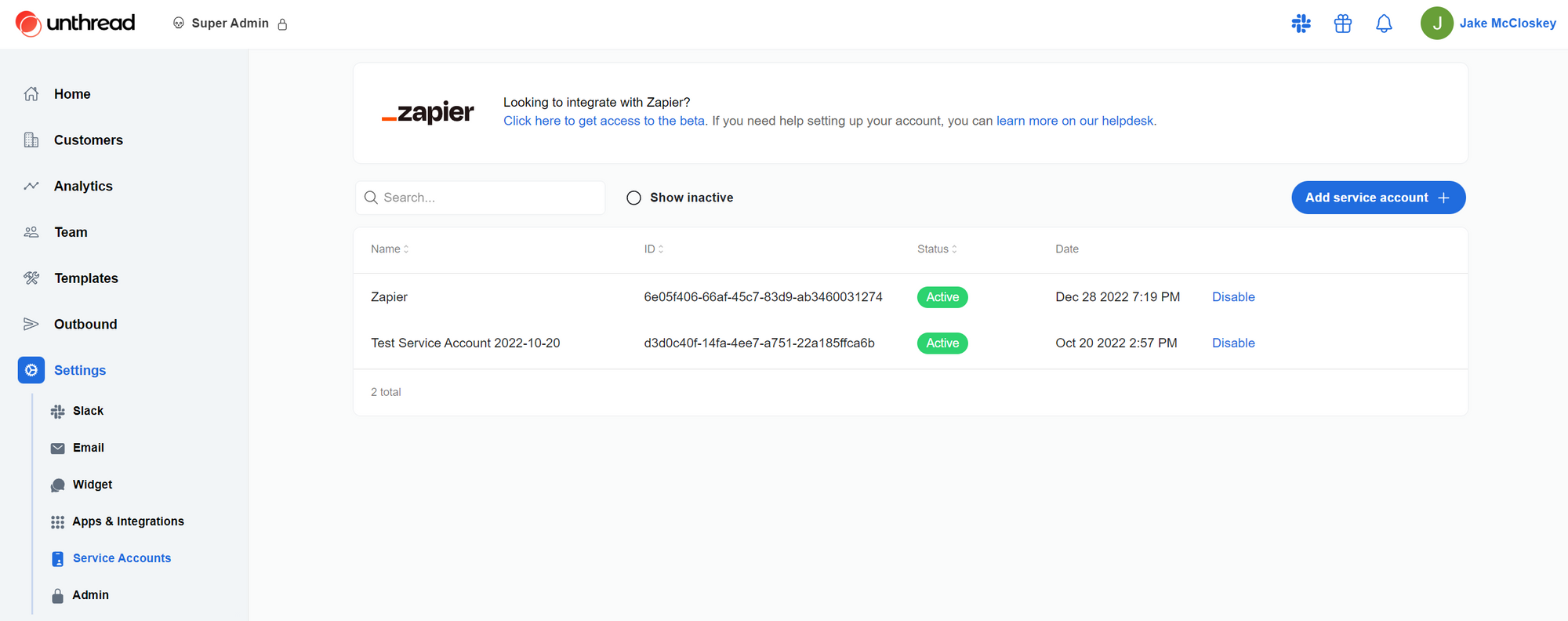
In order to call the API, you will first need to create a service account. Go to your Unthread dashboard and find the Service Accounts tab under Settings. Click “Add service account”, give your service account a name, and click “Submit”.
Calling the API
The URL for calls to the API will have the following form, with $ being replaced by the endpoint you are trying to call:
https://api.unthread.io/api/${endpoint}
In order to authenticate, you must send an HTTP header with the key “X-Api-Key” and the value set to the service account key created in the previous section. All request and response bodies will be in JSON.
API Conventions
The Unthread API follows RESTful conventions when possible, with most operations performed via GET, POST, PATCH, and DELETE requests. Request and response bodies are encoded as JSON.
List Endpoints
All list endpoints follow the same conventions. Requests are made in the following format:
interface Where<WhereField> {
  field: WhereField;
  operator: '==' | '!=' | '>' | '<' | 'in' | 'notIn' | 'contains' | 'notContains' | 'like';
  value: string | number | string[];
}

interface ListRequest<SelectField, OrderByField, WhereField> {
  select?: Array<SelectField>;
  order?: Array<OrderField>;
  where?: Array<Where<WhereField>>;
  limit?: number;
  descending?: boolean;
  cursor?: string;
}
Accepted values for SelectField, OrderByField and WhereField depend on the object. Responses are made in the following format:
interface ListResponse<ObjectType> {
  data: Array<ObjectType>;
  totalCount: number;
  cursors: {
    hasNext: boolean;
    hasPrevious: boolean;
    next?: string;
    previous?: string;
  };
}
Responses are paginated by providing a cursor to the next or previous page. The limit per page is 100. An example list request is provided below:
// Request
// POST /conversations/list
{
  "select": [
		"id",
		"title",
		"initialMessage.ts",
		"initialMessage.text",
		"tags.id",
		"tags.name"
	],
  "order": ["createdAt", "id"],
  "where": [
    {
      "field": "customerId",
      "operator": "==",
      "value": "9YQjOSTFXeOPF8xNURFd"
    }
  ],
  "descending": true,
  "limit": 1,
  "cursor": "W3RydWUsWyIwNTU4MTc5Zi1kYTJkLTQxZjItOTZlYy1iZGY2YzkzZGQ1MjIiXV0="
}

// Response
{
  "data": [
    {
      "id": "0476bfd0-0c3f-4dfb-b462-d75a4a6908e1",
		  "title": "A bug report",
		  "initialMessage": {
        "ts": "1675183719.124879",
        "text": "Help, I found a bug"
      } ,
		  "tags": [
        {
          "id": "32561c55-0f01-47af-aa55-1a3d638f41e8",
          "name": "Bug"
        }
      ]
    }
  ],
  "totalCount": 688,
  "cursors": {
    "hasNext": true,
    "hasPrevious": true,
    "next": "W3RydWUsWyIwNDUzYmFiNi1iNDY3LTQ0MGMtYmMzZi1mNWEyODQ5YzlkYWUiXV0=",
    "previous": "W2ZhbHNlLFsiMDI4ZDg3NzMtY2I5Ni00MDQzLTlmYjYtMGZhOWUzYmFmY2MzIl1d"
  }
}
Create and Update Endpoints
Create and update endpoints can specify a select query param that takes a comma-separated list of fields to return in the response. Example below:
// Request
// PATCH /conversations/0476bfd0-0c3f-4dfb-b462-d75a4a6908e1?select=id,title,initialMessage.ts,initialMessage.text,tags.id,tags.name
{
  "status": "closed"
}

// Response
{
  "id": "0476bfd0-0c3f-4dfb-b462-d75a4a6908e1",
  "title": "A bug report",
  "initialMessage": {
    "ts": "1675183719.124879",
    "text": "Help, I found a bug"
  } ,
  "tags": [
    {
      "id": "32561c55-0f01-47af-aa55-1a3d638f41e8",
      "name": "Bug"
    }
  ]
}
Objects
Conversation
interface Conversation {
  id: string;
  status: "open" | "in_progress" | "on_hold" | "closed";
  customerId: string | null;
  channelId: string;
  wasManuallyCreated: boolean;
  friendlyId: number;
  createdAt: string;
  updatedAt: string;
  closedAt: string | null;
  statusUpdatedAt: string | null;
  responseTime: number | null;
  responseTimeWorking: number | null;
  resolutionTime: number | null;
  resolutionTimeWorking: number | null;
  title: string | null;
  priority: number | null;
  initialMessage: Message;
  assignedToUserId: User | null;
  tags: Array<Tag>;
  customer: Customer | null;
  wakeUpAt: string | null;
  summary: string | null;
  snoozedAt: string | null;
  lockedAt: string | null;
  ticketTypeId: string | null;
  ticketTypeFields: Record<string, string>;
  metadata?: Record<string, string>;
  followers?: {
    userId?: string;
    groupId?: string;
    entityId: string;
  }[];
  collaborators?: {
    collaboratorTypeId: string;
    userId?: string;
    groupId?: string;
    entityId: string;
  }[];
  files?: {
    id: string;
    name: string;
    size: number;
    filetype: string;
    mimetype: string;
  }[];
}
Message
interface Message {
  ts: string;
  userId: string;
  userTeamId: string;
  botId: string;
  botName: string;
  text: string;
  subtype: string | null;
  conversationId: string;
  timestamp: string;
  threadTs: string | null;
  conversation: Conversation;
  user: User | null;
  metadata?: {
    eventType?:
      | "autoresponder_replied"
      | "email_received"
      | "email_explanation_sent"
      | "widget_message_received"
      | "microsoft_teams_message_received"
      | "unthread_outbound"
      | "post_close_template_sent"
      | "customer_view_button"
      | "slack_bot_dm_received";
  };
}
Customer
interface Customer {
  name: string;
  primarySupportAssigneeId: string | null;
  primarySupportAssigneeType: "user" | "team" | null;
  secondarySupportAssigneeId: string | null;
  secondarySupportAssigneeType: "user" | "team" | null;
  replyTimeoutMinutes: number | null;
  defaultTriageChannelId: string | null;
  disableAutomatedTicketing: boolean | null;
  botHandling: "off" | "all" | null;
  autoresponder: AutoresponderOptions | null;
  supportSteps: Array<SupportStep> | null;
  slackTeamId: string | null;
  assignToTaggedUserEnabled: boolean | null;
  slackChannelId: string | null;
  createdAt: string;
  updatedAt: string;
  tags: Array<Tag>;
  slackChannel: SlackChannel | null;
}
Tag
interface Tag {
  id: string;
  name: string;
}
User
interface User {
  id: string;
  name: string;
  email: string;
  slackId: string;
  photo: string;
}
User Team
interface UserTeam {
  id: string;
  name: string;
  slackId: string;
}
Slack Channel
interface SlackChannel {
  id: string;
  name: string;
  isShared: boolean;
  isPrivate: boolean;
}
Simple Condition
interface SimpleCondition {
  leftValue?: any;
  leftValueFrom?: string;
  operator: "equals" | "notEquals" | "greaterThan" | "lessThan" | "greaterThanOrEquals" | "lessThanOrEquals" | "contains" | "notContains" | "in" | "notIn";
  rightValue?: any;
  rightValueFrom?: string;
}
For a “simple condition”, the left and right values are compared using the operator. For example, if the operator is “equals”, the left and right values are compared for equality. For left and right values, either a value can be provided directly or a reference to a field in the “context”, through the leftValueFrom and rightValueFrom fields. The “context” depends on the object and the operation. For example, for ticket type field conditions, the context has the following shape:
{
  "conversation": {
    "ticketTypeFields": {
      "12345678-1234-1234-1234-123456789abc": "value-1",
      "42345678-1234-1234-1234-123456789abd": "value-2"
    }
  }
}
Therefore, a condition can be added on a ticket type field like this:
{
  "leftValueFrom": "conversation.ticketTypeFields['12345678-1234-1234-1234-123456789abc']",
  "operator": "equals",
  "rightValue": "value-1"
}
This will cause the field to be available for a given conversation if the ticket type has field 12345678-1234-1234-1234-123456789abc set to value-1.
Ticket Type Field
interface TicketTypeField {
  id: string;
  label: string;
  type: "short-answer" | "long-answer" | "multi-select" | "single-select" | "checkbox" | "user-select" | "multi-user-select";
  required: boolean;
  public: boolean;
  description: string;
  options?: string[];
  conditions?: {
    type: "simple";
    simple:
      | SimpleCondition
      | {
          and: SimpleCondition[];
        }
      | {
          or: SimpleCondition[];
        };
  };
}
For ticket type field conditions, the only context
Ticket Type
interface TicketType {
  id: string;
  name: string;
  projectId: string;
  description: string;
  createdAt: string;
  updatedAt: string;
  fields: Array<TicketTypeField>;
}
Autoresponder Options
interface AutoresponderOptions {
  enabled: boolean;
  condition: "always" | "outside-working-hours";
  message: string;
}
Support Step
interface SupportStep {
  type: "assignment" | "escalation" | "reminder" | "triage";
  assigneeId?: string;
  assigneeType?: "user" | "team";
  minutes: number;
  shouldCycleThroughTeamMembers?: boolean;
  maxCycles?: number;
  cycleMinutes?: number;
}
Outbound
interface Outbound {
  id: string;
  status: "scheduled" | "draft" | "sent" | "failed";
  deliveryMethod: "slack";
  subject: string;
  // See Slack Block Kit documentation for details on the blocks field: https://api.slack.com/block-kit
  blocks: Array<SlackBlock>;
  recipients: {
    type: "customer";
    id: string;
  }[];
  sendAs: {
    // For type == "support-rep" the ID is the user ID to use as a default if there is no support rep for a given customer.
    type: "user" | "support-rep";
    id: string;
  };
  runAt: string;
}
Webhook Subscription
interface WebhookSubscription {
  id: string;
  url: string;
  enabled: boolean;
}
Approval Request
interface ApprovalRequest {
  status: "approved" | "rejected" | "pending";
  id: string;
  tenantId: string;
  assignedToGroupId?: string;
  assignedToUserId?: string;
  statusChangedAt?: Date;
  conversationId: string;
  title?: string;
  notes?: string;
  createdAt: Date;
  approverUser?: User;
  approverGroup?: UserTeam;
}
Collaborator Type
interface CollaboratorType {
  id: string;
  name: string;
  key: string;
  description?: string;
}
Account
interface Account {
  id: string;
  name: string;
  primarySupportAssigneeId: string | null;
  primarySupportAssigneeType: "user" | "team" | null;
  secondarySupportAssigneeId: string | null;
  secondarySupportAssigneeType: "user" | "team" | null;
  emailsAndDomains: string[];
  slackChannelIds: string[];
  slackTeamIds: string[];
  customFields: any[];
  supportSteps: any[];
  imageUrl: string | null;
  externalCrmMetadata: {
    id: string;
  } | null;
  createdAt: string;
  updatedAt: string;
  createdBy: string;
  updatedBy: string;
  slackChannels: Array<SlackChannel>;
  slackTeams: Array<{
    id: string;
    name: string;
    icon: string;
  }>;
  tags: Array<Tag>;
}
Endpoints
Accounts
Create Account
This endpoint will create and return a new account. Request schema:
interface CreateAccountRequest {
  name: string;
  primarySupportAssigneeId?: string | null;
  primarySupportAssigneeType?: "user" | "team" | null;
  secondarySupportAssigneeId?: string | null;
  secondarySupportAssigneeType?: "user" | "team" | null;
  emailsAndDomains?: string[];
  slackChannelIds?: string[];
  slackTeamIds?: string[];
  customFields?: any[];
  supportSteps?: any[];
  imageUrl?: string | null;
  externalCrmMetadata?: {
    id: string;
  } | null;
}
Get Account by ID
This endpoint will return the given account.
Update Account
PATCH /accounts/:accountId
This endpoint will return the updated account. All fields from the create request schema can be updated.
Delete Account
DELETE /accounts/:accountId
This endpoint will delete the given account.
List Accounts
This endpoint will return a list of accounts following the standard list conventions. Supported fields for select, order, and where operations:
idnameimageUrlprimarySupportAssigneeIdprimarySupportAssigneeTypesecondarySupportAssigneeIdsecondarySupportAssigneeTypeprimarySupportAssignee.idprimarySupportAssignee.namesecondarySupportAssignee.idsecondarySupportAssignee.nameemailsAndDomainsslackChannelIdsslackTeamIdscustomFieldssupportStepscreatedAtupdatedAtcreatedByupdatedByslackChannels.idslackChannels.nameslackChannels.isPrivateslackChannels.isSharedslackChannels.archivedAtslackChannels.slackTeamIdslackTeams.idslackTeams.nameslackTeams.icontags.idtags.nameexternalCrmMetadata
Approval Requests
Create Approval Request for Conversation
POST /conversations/:conversationId/approval-requests
This endpoint will return the newly created approval request. Fields that can be set on create are: title, assignedToUserId and assignedToGroupId.
Get Approval Requests for Conversation
GET /conversations/:conversationId/approval-requests
This endpoint will return a list of approval requests for the given conversation.
Automations
Create Automation
This endpoint creates a new automation.
Request Body
The request body should be a JSON object with the following structure:
{
  name: string;
  description?: string | null;
  status?: 'draft' | 'active' | 'inactive';
  trigger: AutomationTrigger;
  steps: AutomationStep[];
  conditions?: Conditions | null;
}
name(required): The name of the automation.description(optional): A description of the automation.status(optional): The status of the automation. Defaults to ‘draft’ if not provided.trigger(required): The trigger configuration for the automation.steps(required): An array of steps that define the automation’s actions.conditions(optional): Conditions that determine when the automation should run.
AutomationTrigger
The trigger field should be an object with a type property and a data property. The structure depends on the trigger type:
{
  type: "event" | "manual" | "webhook" | "slackReaction" | "scheduled" | "delay";
  data: {
    // Fields depend on the trigger type
  }
}
AutomationStep
Each step in the steps array should be an object with a type property and a data property:
{
  type: "action" | "branches";
  data: {
    // Fields depend on the step type
  }
}
Response
The response will be a JSON object representing the created automation, including its ID and other details.
Notes
- Automations are only available if custom actions are enabled for the tenant.
Conversation Management
Add Follower to Conversation
POST /conversations/:conversationId/add-follower
This endpoint will add a follower to the given conversation. The request body should contain the entityId of the follower to add and the entityType which is either “user” or “group”.
Remove Follower from Conversation
POST /conversations/:conversationId/remove-follower
This endpoint will remove a follower from the given conversation. The request body should contain the entityId of the follower to remove.
Assign Collaborator to Conversation
PUT /conversations/:conversationId/collaborators/:collaboratorTypeId
This endpoint will add a collaborator with the given collaborator type to the given conversation. The request body should contain the entityId of the collaborator to add and the entityType which is either “user” or “group”.
List Collaborator Types
POST / collaborator - types / list;
This endpoint will return a list of collaborator types.
Conversations
Create Conversation
This endpoint will create and return a new conversation. Behavior will differ depending on the type field:
- For
type == "slack", the conversation will be for communication in Slack. You can choose to post the details either into a DM or into a channel. - For
type == "triage", the conversation will be for internal discussion only and there will be no way to communicate with the customer. ThetriageChannelIdfield is required. - For
type == "email", the conversation will be continued via email replies. Replies in the thread with/unthread sendappended will be sent to the customer via email. TheemailInboxIdfield is required. TheonBehalfOffield is used to specify the email address and name of the end user to communicate with.
If customerId is provided, the conversation will be linked to the given customer and that customer’s autoresponder and SLA settings will be applied. Request schema:
interface CreateConversationRequest {
  type: "triage" | "email" | "slack";
  markdown: string;
  status: "open" | "in_progress" | "on_hold" | "closed";
  assignedToUserId?: string;
  customerId?: string;
  channelId?: string; // Only required if type == "slack". If not provided, the conversation will be continued through the Unthread app for Slack via a DM.
  projectId?: string;
  priority?: 3 | 5 | 7 | 9;
  triageChannelId?: string; // Only required if type == "triage"
  notes?: string;
  title?: string;
  excludeAnalytics?: boolean;
  emailInboxId?: string; // Only required if type == "email"
  ticketTypeId?: string;
  onBehalfOf?: {
    // Only required if type == "email". Either email or id must be provided.
    email?: string;
    name?: string;
    id?: string;
  };
}
Attachments
Files can be attached to the conversation by making a multipart/form-data request instead of a JSON request. The JSON payload should be included as a form field named json and the files should be included as additional form fields with the name attachments and the file as the value. Up to 10 files can be attached to a single conversation and the maximum file size is 20MB. See the following Javascript example for clarification:
const formData = new FormData();

formData.append(
  "json",
  JSON.stringify({
    type: "email",
    markdown: "Hello, world!",
    status: "open",
    onBehalfOf: {
      email: "[email protected]",
      name: "Example User",
    },
    emailInboxId: "12345678-1234-1234-1234-123456789abc",
  })
);

formData.append("attachments", file1);
formData.append("attachments", file2);

await fetch("https://api.unthread.io/api/conversations", {
  method: "POST",
  headers: {
    "X-Api-Key": "Bearer YOUR_API_KEY",
  },
  body: formData,
});
Notes:
- Markdown should follow the Slack formatting guide.
- For more info on multipart/form-data requests, see the IETF RFC 7578.
Get Conversation by ID
GET /conversations/:conversationId
This endpoint will return the given conversation.
Update Conversation
PATCH /conversations/:conversationId
This endpoint will return the updated conversation. Fields that can be updated are:
statusprioritynotesassignedToUserIdwakeUpAtsnoozedAtexcludeAnalyticstitlelockedAtcustomerIdticketTypeIdticketTypeFieldssubmitterUserIdmetadata
List Conversations
POST / conversations / list;
This endpoint will return a list of conversations.
List Messages for Conversation
POST /conversations/:conversationId/messages/list
This endpoint will return a list of messages for a given conversation.
Create Message in Conversation
POST /conversations/:conversationId/messages
This endpoint will post a new message into a Slack thread for a conversation. Sample request:
interface Block {
  type: "section" | "survey";
  text?: {
    text: string;
    type: "mrkdwn" | "plaintext";
  };
  survey_id?: string;
}

interface CreateMessageRequest {
  body?: {
    type: "html" | "markdown";
    value: string;
  };
  blocks?: Block[];
  markdown?: string; // DEPRECEATED: Use 'blocks' and/or 'body' instead
  triageThreadTs?: string;
  isPrivateNote?: boolean; // Only applicable for email and in-app chat conversations
  isAutoresponse?: boolean; // Set this to true to treat this as a bot auto-response. Useful when responding to a conversation with your own AI bot.
  onBehalfOf?: {
    email?: string;
    name?: string;
    id?: string;
  };
}
Notes:
- Either
body,blocksormarkdownmust be provided. - If both
blocksandbodyormarkdownare provided, theblockswill be appended after themarkdowncontent - Only pass in
triageThreadTsif you want the message to be posted to a triage thread for that conversation rather than being sent to the customer. - For email and in-app chat conversations, set
isPrivateNotetotrueto mark the message as a private note which will post to the Slack thread for the conversation without sending a response back to the customer. - File attachments can also be included. See the section on adding attachments when creating a conversation for more information.
- If
onBehalfOfis provided, the message will be sent as the given user. If not provided, the message will be sent as the Unthread bot.
Download File Attachment
GET /conversations/:conversationId/files/:fileId/full
This endpoint will return the full contents of a file attachment for a given conversation. The :fileId can be found in the files array of the conversation object.
Customers
Get Customer by ID
GET /customers/:customerId
This endpoint will return the given customer.
Update Customer
PATCH /customers/:customerId
This endpoint will return the updated customer. Fields that can be updated are: name, slackChannelId, autoresponder, supportSteps, defaultTriageChannelId, disableAutomatedTicketing, primarySupportAssigneeId, primarySupportAssigneeType, secondarySupportAssigneeId, secondarySupportAssigneeType, replyTimeoutHours, botHandling, emailDomains.
Create Customer
This endpoint will return the newly created customer and will create a Slack channel automatically if the createChannel flag is set to true.
interface CreateCustomerRequest {
  name: string;
  slackChannelId?: string;
  emailDomains?: string[];
  tagIds?: string[],
  isPrivate?: boolean;
  inviteUserIds?: string[];
  channelTopic?: string; // max 250 characters
  createChannel?: boolean; // to create a channel in Slack for this customer
}
Delete Customer
DELETE /customers/:customerId
This endpoint will delete the given customer.
List Customers
This endpoint will return a list of customers.
Knowledge Base
Query Knowledge Base
POST / knowledge - base / query;
This endpoint allows you to make a one-off query to the knowledge base. You can optionally pass various context parameters to influence the query results. Request schema:
interface QueryKnowledgeBaseRequest {
  query: string; // Required
  customerId?: string; // Optional
  userId?: string; // Optional
  conversationId?: string; // Optional
}
Parameters
query(required): The string query to search for in the knowledge base.customerId(optional): The ID of the customer associated with this query.userId(optional): The ID of the user making the query.conversationId(optional): The ID of the conversation context for this query.
Example request:
{
  "query": "How do I reset my password?",
  "customerId": "9YQjOSTFXeOPF8xNURFd",
  "userId": "63335fa9-ffcc-4103-8905-e4440cc7c7d4",
  "conversationId": "0476bfd0-0c3f-4dfb-b462-d75a4a6908e1"
}
Create Knowledge Base Article
POST / knowledge - base / articles;
This endpoint allows you to create a new article in the knowledge base. Request schema:
interface CreateKnowledgeBaseArticleRequest {
  title: string; // Required
  content: string; // Required
  url?: string; // Optional
  userGroupIds?: string[]; // Optional
}
Parameters:
title(required): The title of the knowledge base article.content(required): The content of the knowledge base article.url(optional): The URL associated with this article.userGroupIds(optional): Array of user group IDs that have access to this article.
Example request:
{
  "title": "How to Reset Your Password",
  "content": "To reset your password, go to the login page and click on 'Forgot Password', then follow the instructions sent to your email.",
  "url": "https://help.example.com/password-reset",
  "userGroupIds": ["63335fa9-ffcc-4103-8905-e4440cc7c7d4"]
}
Get Knowledge Base Article by ID
GET /knowledge-base/articles/:articleId
This endpoint retrieves a specific knowledge base article by its ID. Example response:
{
  "id": "63335fa9-ffcc-4103-8905-e4440cc7c7d4",
  "title": "How to Reset Your Password",
  "content": "To reset your password, go to the login page and click on 'Forgot Password', then follow the instructions sent to your email.",
  "url": "https://help.example.com/password-reset",
  "status": "active",
  "userGroupIds": ["63335fa9-ffcc-4103-8905-e4440cc7c7d4"],
  "createdAt": "2023-04-15T14:32:21Z",
  "updatedAt": "2023-04-16T09:14:07Z"
}
Update Knowledge Base Article
PATCH /knowledge-base/articles/:articleId
This endpoint allows you to update an existing article in the knowledge base. Request schema:
interface UpdateKnowledgeBaseArticleRequest {
  title?: string; // Optional
  content?: string; // Optional
  url?: string; // Optional
  userGroupIds?: string[]; // Optional
  status?: "active" | "inactive"; // Optional
}
Parameters:
title(optional): The updated title of the knowledge base article.content(optional): The updated content of the knowledge base article.url(optional): The updated URL associated with this article.userGroupIds(optional): Updated array of user group IDs that have access to this article.status(optional): The status of the article, either “active” or “inactive”.
Example request:
{
  "title": "Updated: How to Reset Your Password",
  "status": "inactive"
}
Delete Knowledge Base Article
DELETE /knowledge-base/articles/:articleId
This endpoint deletes an article from the knowledge base.
List Knowledge Base Articles
POST / knowledge - base / articles / list;
This endpoint will return a list of knowledge base articles following the standard list conventions. Example request:
{
  "select": ["id", "title", "url", "status"],
  "order": ["createdAt"],
  "where": [
    {
      "field": "status",
      "operator": "==",
      "value": "active"
    }
  ],
  "descending": true,
  "limit": 10
}
Outbound Messages
Create and/or send an outbound message
This endpoint will create an outbound and send it, unless the status is set to “draft”. Drafts can be sent later by updating the status to “scheduled”.
Update and/or send an outbound message
PATCH /outbounds/:outboundId
This endpoint will update an outbound. Drafts can be sent by updating the status to “scheduled”.
List outbounds
This endpoint will list all outbounds.
Get outbound by ID
GET /outbounds/:outboundId
This endpoint will return the given outbound.
Reporting
POST / reporting / time - series;
This endpoint will return metrics about your conversations. Requests are made in the following format:
type Metric = "totalCount" | "responseTimeMean" | "responseTimeWorkingMean" | "resolutionTimeMean" | "resolutionTimeWorkingMean" | "conversationsResolved";
type DateDimension = "day" | "week" | "month";
type Dimension = "assigneeId" | "customerId" | "tagId" | "sourceType";

interface ReportingTimeSeriesRequest {
  timezone?: string;
  startDate: string;
  endDate: string;
  dateDimension?: DateDimension;
  metric: Metric;
  dimensions?: Dimension[];
  filters?: {
    [dim: Dimension]: string | string[];
  };
}
- The
timezonefield is optional and defaults to “UTC”. startDateandendDatehave the following format: “2022-12-31”. The dates are inclusive.dateDimensionspecifies the time period in which the data should be grouped.- All metrics are numbers. Response and resolution times are in seconds.
dimensionsis an array of fields to group the data by in addition to the date.filtersallows you to filter the data to specific dimensions. If an array is passed for a given dimension, then it is treated as anOR.
Responses are returned in the following format:
type Dimension = "assigneeId" | "customerId" | "tagId" | "sourceType";

type DataSplit = {
  [key: string]: DataPoint;
};
type DataPoint = number | DataSplit;

interface ReportingTimeSeriesResponse {
  data: DataSplit;
  dates: string[];
  lookups: {
    [dim: Dimension]: {
      [key: string]: string;
    };
  };
}
- If there is no data for a particular day, then that day will not be included in the
dataobject; however, it will be included in thedatesarray. - If dimensions are included in the request, then the data will be nested for each dimension included. Dimensions are nested in the order they are included in the request. See the example below for clarification.
datesis an array of the time periods covered by the query. For grouping by weeks, each value in the array is the first day of the week starting on Monday. For grouping by months, each value in the array is the first day of the month.lookupscontains friendly names for the keys contained indata. For example, if grouping bycustomerId, the lookups would contain a mapping from the customer ID to the customer name.
An example request and response are included below:
// Request
// POST /reporting/time-series
{
  "dateDimension": "week",
	"startDate": "2022-12-01",
	"endDate": "2022-12-31",
	"metric": "totalCount",
	"timezone": "America/New_York",
	"filters": {
		"assigneeId": [
			"63335fa9-ffcc-4103-8905-e4440cc7c7d4",
			"2e8dab53-a7a2-4e1f-b9d9-66018b98365d"
		]
	},
	"dimensions": ["customerId", "sourceType"]
}

// Response
{
   "lookups":{
      "customerId":{
         "9YQjOSTFXeOPF8xNURFd": "Customer 1",
         "AWEpBY0uqxfp73HaTVS4": "Customer 2",
			 "aZHO2af1RFa92QiOq3Y4": "Customer 3"
      },
      "sourceTypes":[]
   },
   "dates":[
      "2022-11-28",
      "2022-12-05",
      "2022-12-12",
      "2022-12-19",
      "2022-12-26"
   ],
   "data":{
      "9YQjOSTFXeOPF8xNURFd":{
         "slack":{
            "2022-11-28":19,
            "2022-12-12":70,
            "2022-12-19":17
         },
			 "widget":{
            "2022-11-28":6,
            "2022-12-12":1
         }
      },
      "AWEpBY0uqxfp73HaTVS4":{
         "email":{
            "2022-12-31":1
         },
			 "slack":{
            "2022-11-28":6,
            "2022-12-12":1
         }
      },
      "aZHO2af1RFa92QiOq3Y4":{
         "slack":{
            "2022-11-28":6,
            "2022-12-12":1
         }
      }
   }
}
Slack Integration
Update Slack User Group
This endpoint updates a Slack user group. Parameters:
email(required): The email address of the user to update.slackHandle(required): The Slack handle of the user to update.
Example request:
{
  "email": "[email protected]",
  "slackHandle": "test"
}
Tags
Get Tag by ID
This endpoint will return the given tag.
Update Tag
This endpoint will return the updated tag. Fields that can be updated are: name.
Create Tag
This endpoint will return the newly created tag. Fields that can be updated or set on create are: name
Delete Tag
This endpoint will delete the given tag.
List Tags
This endpoint will return a list of tags.
Add Tag to Customers
POST /tags/:tagId/customers/create-links
This endpoint takes an array of customer IDs and will assign the given tag to all the specified customers. Sample request body: [ '93ba5298-a23f-413b-94fe-73e0ab26a816', '7ab46970-19ec-492e-90fe-47a8abc93fec' ]
Add Tag to Conversations
POST /tags/:tagId/conversations/create-links
This endpoint takes an array of conversation IDs and will assign the given tag to all the specified conversations. Sample request body: [ 'ad00e2d0-4ea4-45c4-9b5d-8728f93e51a7', 'e82cde04-0d59-4416-b5da-1f405f6d4ddb' ]
Remove Tag from Customers
POST /tags/:tagId/customers/delete-links
This endpoint takes an array of customer IDs and will remove the given tag from all the specified customers.
Remove Tag from Conversations
POST /tags/:tagId/conversations/delete-links
This endpoint takes an array of conversation IDs and will remove the given tag from all the specified conversations.
Ticket Types
Create Ticket Type
This endpoint creates a new ticket type. Example request body:
{
  "name": "Access Request",
  "description": "A request for access to a resource",
  "fields": [
    {
      "id": "12345678-1234-1234-1234-123456789abc",
      "name": "Application",
      "type": "single-select",
      "required": true,
      "options": ["Salesforce", "Slack"]
    },
    {
      "id": "42345678-1234-1234-1234-123456789abd",
      "name": "Access Level",
      "type": "single-select",
      "required": true,
      "options": ["Admin", "User"],
      "conditions": {
        "type": "simple",
        "simple": {
          "leftValueFrom": "conversation.ticketTypeFields['12345678-1234-1234-1234-123456789abc']",
          "operator": "equals",
          "rightValue": "Salesforce"
        }
      }
    }
  ]
}
Update Ticket Type
PATCH /ticket-types/:ticketTypeId
This endpoint updates a ticket type.
Delete Ticket Type
DELETE /ticket-types/:ticketTypeId
This endpoint deletes a ticket type.
List Ticket Types
POST / ticket - types / list;
This endpoint lists all ticket types.
Get Ticket Type
GET /ticket-types/:ticketTypeId
This endpoint gets a ticket type.
Users
List Users
This endpoint will return a list of users who are a member of your Slack workspace and have been synced into Unthread. To return external users, pass in the includeExternalUsers field with a value of true.
Get User by ID
This endpoint will return the given user.
Webhooks
Create Webhook Subscription
POST / webhook - subscriptions;
This endpoint will return the newly created webhook subscription. Fields that can be set on create are: url and enabled.
Update Webhook Subscription
PATCH /webhook-subscriptions/:webhookSubscriptionId
This endpoint will return the updated webhook subscription. Fields that can be updated are: url and enabled.
Delete Webhook Subscription
DELETE /webhook-subscriptions/:webhookSubscriptionId
This endpoint will delete the given webhook subscription.
List Webhook Subscriptions
GET / webhook - subscriptions;
This endpoint will return a list of webhook subscriptions.